

Lifecycle: Subscriptions
Automate provisioning and de-provisioning with subscription webhooks.
Once a contract is signed, someone still has to set the customer up in your own product: create their account, turn on the right products, and give them the right number of seats or licences. This is usually done by hand. A sales or ops person opens an internal tool and copies over what was sold, which is slow and easy to get wrong.
MonetizeNow sends a webhook every time a subscription is created or changed. You can use these webhooks to provision and de-provision customers in your product automatically.
For Revenue Operations
When a quote is processed in MonetizeNow, your product can set the customer up on its own. Your engineering team connects the two once. From then on, nobody has to copy seats or products from an order form into an internal tool.
What happens, and when
| When this happens in MonetizeNow | Your product can automatically |
|---|---|
| A new business quote is processed | Create the customer and turn on each product they bought, with the right number of seats or licences |
| An amendment or renewal quote changes quantities or products | Add or remove seats and products to match |
| An amendment removes an offering, or a subscription is canceled | Turn off access to what was removed |
What this means for your team
- The processed quote is the source of truth. Whatever is on the quote when it's processed is what the customer gets in your product. Getting products and quantities right on the quote is what keeps provisioning right.
- Your catalog needs to line up with your product. Each offering on a quote becomes a subscription, and each product in that offering becomes something your product can switch on. Agree with engineering which MonetizeNow products map to which features or licence types in your app.
- Future-dated changes wait for their effective date. If an amendment removes an offering starting in a later billing period, access stays on until the bill run that reaches that date.
- Access can wait until a subscription is active. A new subscription can start out as pending. Engineering can choose to give access only once it's active.
- Two cases need a backup check. When a canceled contract finishes invoicing, or a contract reaches Finished, MonetizeNow doesn't send a webhook. Ask engineering to also run a scheduled check so access is turned off in these cases too.
Before you begin
- You know how a subscription maps to your product catalog:
| Subscription entity | Product catalog entity | Field in the webhook payload |
|---|---|---|
| Subscription | One Offering, priced with one Rate | offering, rateId |
| Subscription item | One Product within that Offering | subscriptionItems[].product |
Register your endpoint
- Create a webhook with your endpoint
url, adescription,enabled: true, and the events you need:subscription.createdandsubscription.updated. - Save the
secretreturned with the webhook (it starts withwhsec). You use it to verify each request.
Receive and verify each request
MonetizeNow sends every event as an HTTP POST with a JSON body:
{
  "eventId": "whevt_…",
  "tenantId": "…",
  "timezone": "…",
  "userId": "…",
  "sentTime": "…",
  "eventType": "subscription.created",
  "data": { "…": "the subscription" }
}- Verify the signature. The
X-MonetizeNow-Signatureheader is the Base64-encoded HMAC-SHA256 of the JSON body, keyed with your webhook secret. Compute the same value and reject the request if it doesn't match. - Respond with a 2xx status quickly, then do the provisioning work. Any other response, or a connection error, is treated as a failure.
- Make your handler idempotent. A failed delivery is retried up to 3 times with exponential backoff, starting at about 5 seconds with jitter. A retry can repeat an event you already processed, so de-duplicate on
eventId. After the last retry the event is not sent again.
The request also carries X-Tenant-Id and X-User-Id headers.
Provision a customer when a subscription starts
-
Handle
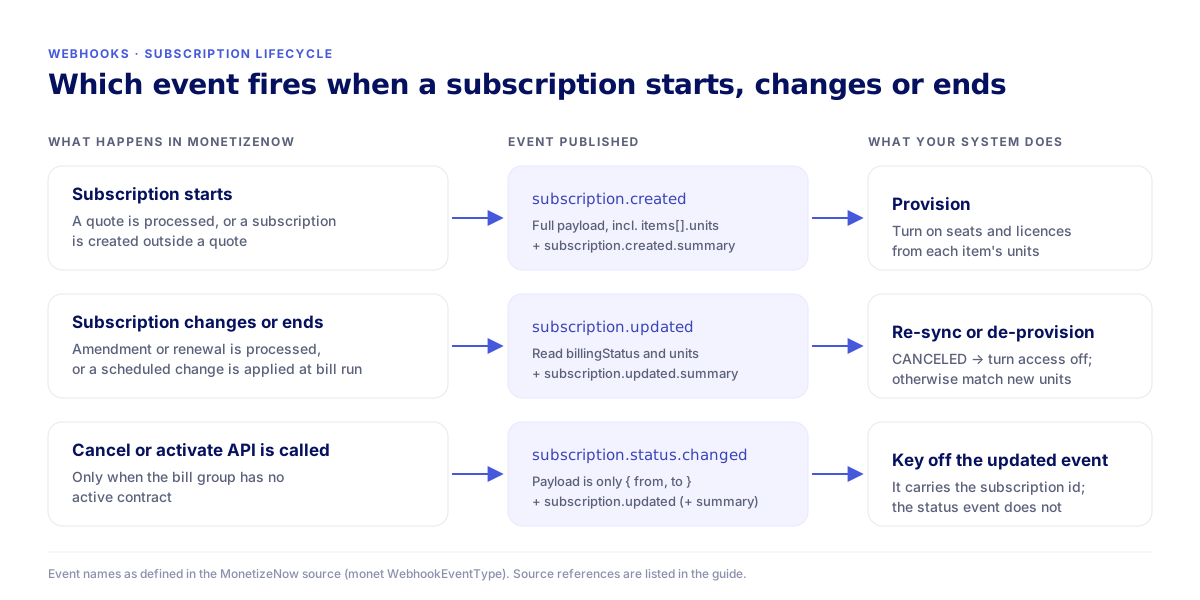
subscription.created. MonetizeNow sends it for each new subscription when:- a quote is processed, once for every subscription the quote creates, or
- a subscription is created directly, outside a quote.
-
Look up the customer from
data.accountanddata.billGroupId. Storedata.id(anddata.customId, if you set one) against the customer in your system. -
Read the quantities from the full event, not the summary.
Everysubscription.createdis followed by asubscription.created.summaryevent. The summary lists each item'sproductIdandproductType, but leaves outunits. Seat and licence counts are only indata.subscriptionItems[].unitson the full event. -
Turn on each product. For every entry in
data.subscriptionItems, enableproductwithunitsseats or licences. Skip items whereisActiveisfalse. -
Check
data.billingStatusbefore you grant access. A subscription can bePENDING. If you only want to give access to running subscriptions, provision whenbillingStatusisACTIVE.
Keep the customer in sync when a subscription changes
- Handle
subscription.updated. MonetizeNow sends it when:- an amendment or renewal quote is processed, once for each subscription it changes or cancels,
- a scheduled change from a quote takes effect during a bill run, and
- the cancel or activate API is called for a subscription.
- Compare
data.subscriptionItems[].unitswith what you have provisioned and adjust. - Use
data.billingStatusto decide whether the customer still gets access (see the next section).
De-provision a customer when a subscription ends
Use subscription.updated and check data.billingStatus. When it is CANCELED, turn off access to every product in data.subscriptionItems for that subscription data.id.
Why not
subscription.status.changed?
Itsdatacontains onlyfromandto(for exampleACTIVE→CANCELED). It does not include the subscription id or account, so you can't tell which customer to de-provision from that event alone. It is also sent only when the cancel or activate API is called, or when a subscription's status changes through the subscription update API. Cancellations made through a quote amendment or a bill run do not send it. Everysubscription.status.changedis followed by asubscription.updatedthat does carry the full subscription.
When a subscription is canceled
%%{init: {"theme": "base", "themeVariables": {"primaryColor": "#F2F3FF", "primaryBorderColor": "#7779F6", "primaryTextColor": "#05115E", "lineColor": "#4659DA", "fontFamily": "Inter, sans-serif"}}}%%
flowchart LR
    A["Amendment quote removes<br/>an offering"] --> B{"Effective date in the<br/>current billing period?"}
    B -- Yes --> C["Canceled when the<br/>quote is processed"]
    B -- No --> D["Canceled during the<br/>bill run that reaches it"]
    C --> U["subscription.updated<br/>billingStatus = CANCELED"]
    D --> U
    E["PUT .../subscriptions/{id}/cancel<br/>(bill group has no active contract)"] --> S["subscription.status.changed<br/>{ from, to }"]
    S --> U
    F["Canceled contract finishes<br/>invoicing"] --> N["Subscriptions set to CANCELED<br/>— no subscription webhook"]
    U --> X(["De-provision this subscription"])
Cancellations that don't send a subscription webhook
- A canceled contract finishes invoicing. When a contract is
CANCELEDand fully invoiced, MonetizeNow cancels its bill group and sets each subscription toCANCELEDwithout sending a subscription webhook. - A contract reaches
FINISHED. The bill group is canceled, but the subscriptions'billingStatusis not changed.
If you need to catch these, check subscription status on a schedule as well as listening for webhooks.
Reference
Subscription events
| Event | Sent when | data |
|---|---|---|
subscription.created | A subscription is created, from a processed quote or directly | Full subscription |
subscription.created.summary | Right after every subscription.created | Subscription summary |
subscription.updated | A quote, bill run or status API changes a subscription | Full subscription |
subscription.updated.summary | Right after every subscription.updated | Subscription summary |
subscription.status.changed | The status API, or the subscription update API, changes billingStatus | { from, to } only |
subscription.canceled | Listed as an event type, but not sent today | — |
Full subscription (data)
data)| Field | Description |
|---|---|
id, customId, referenceId | Subscription identifiers |
account | The customer account |
billGroupId | Bill group the subscription belongs to |
offering, rateId | What was sold and the Rate it is priced with |
subscriptionItems[] | One per product: id, product, units, isActive, customPrice, quoteItemId |
billingStatus | ACTIVE, PENDING, SUSPENDED or CANCELED |
provisioningStatus | PENDING, PROVISIONED, SUSPENDED, INACTIVE, CANCELED or DELETED |
periodStartDate, periodEndDate | Current service period |
usagePeriodStart, usagePeriodEnd | Current usage period |
nextBillDate, nextUsageBillDate, prorationDate | Billing dates |
mrr, discounts, addOn, locked, quoteOfferingId, description | Other subscription details |
The summary keeps id, customId, account, rateId, description, billGroupId, billingStatus, provisioningStatus, the period dates, and subscriptionItems[] with only id, productId, productType and usageTypes.
Delivery
| Item | Value |
|---|---|
| Method | POST, JSON body |
| Body | eventId, tenantId, timezone, userId, sentTime, eventType, data |
| Headers | X-MonetizeNow-Signature, X-Tenant-Id, X-User-Id |
| Signature | Base64 of HMAC-SHA256 over the JSON body, keyed with the webhook secret (whsec…) |
| Success | Any 2xx response |
| Retries | Up to 3, exponential backoff from about 5 s with jitter; not sent again after that |
Updated 12 days ago