
Discounts
Who this is for: Sales reps who build quotes, and the admins and revenue operations teams who set up the discounts reps can use.
MonetizeNow gives you three ways to take money off a deal. Two of them lower the price of individual products: catalog discounts and custom discounts. The third, a Onetime Discount Product, takes a fixed amount off the deal as a whole.
This page is organized so you can jump to what you need:
| If you want to… | Go to |
|---|---|
| Understand which discount to use and how they behave | Understanding discounts |
| Follow one deal from start to finish | Walkthrough: discount a deal |
| Complete a specific task | How-to guides |
| Look up a field, label, or rule | Reference |
| Get a quick answer | FAQ |
Understanding discounts
The three ways to discount
| Catalog discount | Custom discount | Onetime Discount Product | |
|---|---|---|---|
| What it does | Lowers the price of the products it applies to | Lowers the price of the products you apply it to | Takes a fixed amount off the whole quote |
| Changes line item prices? | Yes | Yes | No. Every other product keeps its full price. |
| Who sets it up | Admins, ahead of time, in the Product Catalog | The rep, on the quote | Admins create the product. The rep enters the amount on the quote. |
| How it's entered | Picked from a list | A percentage, or a target amount that MonetizeNow converts to a percentage | A dollar amount |
| Best for | Promotions, standard partner or volume discounts | Negotiated, deal-specific concessions | A flat credit, like "$5,000 off to switch from a competitor" |
| How it's billed | Lower prices on the invoice | Lower prices on the invoice | A credit note applied to invoices |
| Carries over on renewal? | Yes, unless it's set to be removed upon renewal | Yes, unless it's set to be removed upon renewal | No |
A quick way to choose: If the customer should see a lower price per unit, use a catalog or custom discount. If the customer should see your full prices plus one clear credit for this deal only, use a Onetime Discount Product.
The quote below uses all three. The Platform License line has a 5% catalog discount (Partner Discount) and a 10% custom discount, for 15% off. The Switching Credit offering holds a $1,000 Onetime Discount Product. Under Subtotal, one Discount line adds up every discount on the quote: $1,500 off the license plus the $1,000 credit.
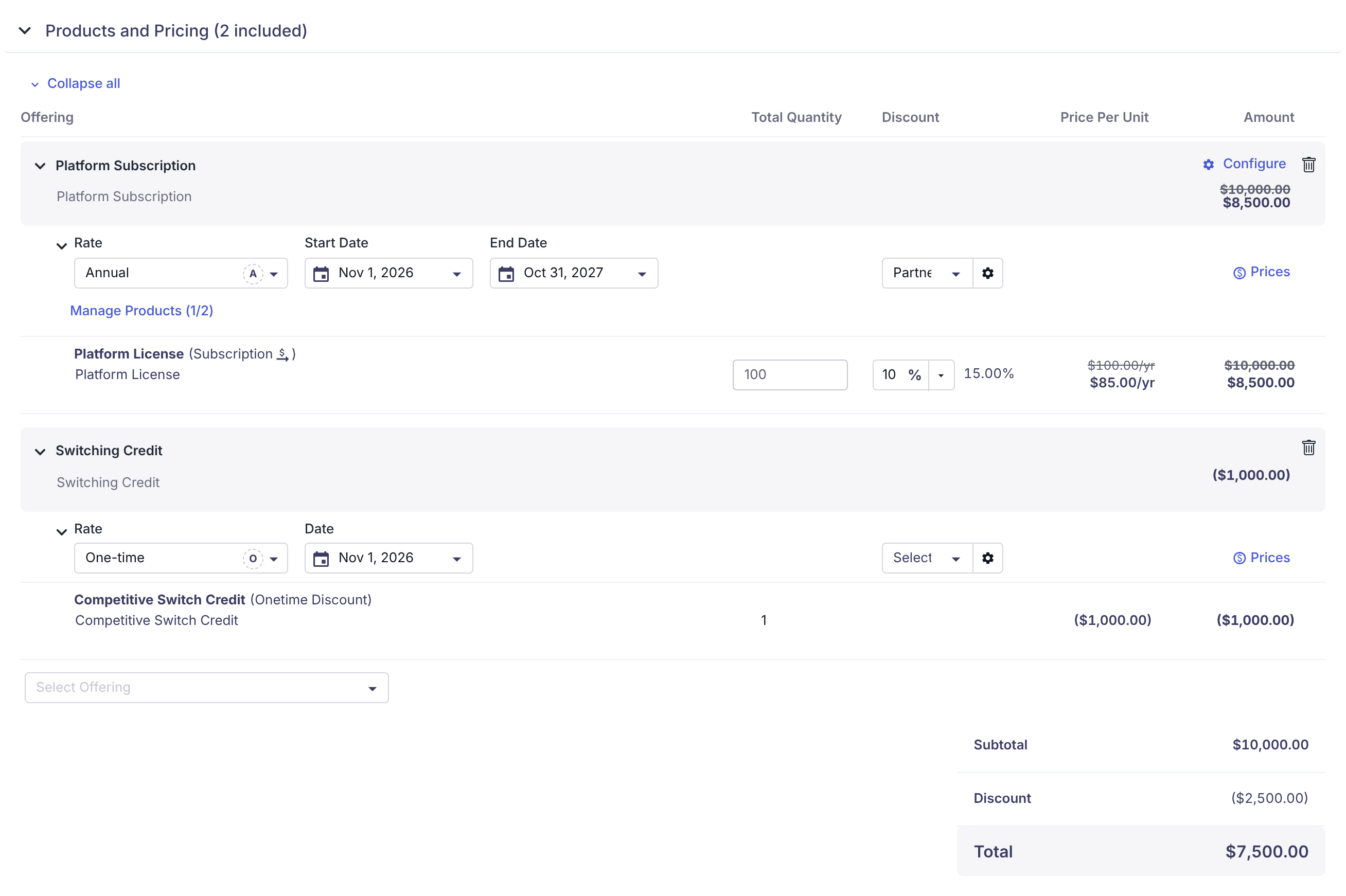
A quote that uses all three discount types. One Discount line under Subtotal covers all of them.
Catalog discounts
Catalog discounts are standard discounts that admins set up in advance in Product Catalog › Discounts. Reps pick them from the discount list on a quote offering, so everyone offers the same promotion the same way.
An admin can limit a catalog discount to certain offerings, products, rates, or a single account. An admin can also give it start and end dates, or set it to be removed when the contract renews.
Custom discounts
Custom discounts are one-off discounts that a rep creates on a quote. You enter a percentage on a product line, or you enter the total you want to charge and let MonetizeNow work out the percentage. You can give a custom discount its own name and description so it explains the deal, for example "Multi-year commitment discount."
Custom discounts are percentages. They apply to subscription and one-time products. Usage products can't receive an offering-level custom discount.
When a line has both a catalog and a custom discount
When a product line has a catalog discount and a custom discount, MonetizeNow adds the percentages together and applies the total once. For example, a $100 product with a 5% catalog discount and a 10% custom discount gets 15% off, so it costs $85.00. If a line has more than one catalog discount, those are added in too.
To see the breakdown, hover over the total discount percentage next to the custom discount field.

The line tooltip lists each discount and how they add up: 5% + 10% = 15.00% off, for a price per unit of $85.00.
Onetime Discount Products
A Onetime Discount Product takes a fixed amount off the whole quote. Your other products keep their full prices on the quote and the invoice, and the discount appears as its own line with a negative amount. It applies to the current contract term only.
How it's billed:
- MonetizeNow doesn't put a negative line on the invoice. Instead, it creates a credit note for each Onetime Discount Product on the quote when the quote is processed.
- The credit is applied automatically to the customer's invoices for the same bill group. If the discount is larger than the first invoice, the remaining balance stays on the credit and is applied to later invoices.
- The quote's billing schedule shows standard charges only. The quote tells you this directly: "The billing schedule reflects standard charges only. Any applicable credits or discounts associated with Discount Products will be applied at the time of invoicing."
- If an amendment removes the offering that contains the Onetime Discount Product, its credit note is voided. See Void Credit / Credit Note.
How discounts carry over on amendments and renewals
When you amend or renew a contract, MonetizeNow builds the new quote from the one before it, including its discounts.
- Custom discounts stay custom. They keep the same percentage, name, and description, so the context you gave the customer comes along with them. This changes how a carried-over custom discount is displayed on the new quote. It doesn't change how the discount is calculated.
- Catalog discounts stay catalog. A catalog discount carries over as the same catalog discount, even if your admin has since made it inactive. Existing deals keep the discount they were sold with.
- Discounts marked "remove upon renewal" are dropped at renewal. This applies to catalog discounts with Remove this discount upon renewal checked and to custom discounts with Remove Upon Renewal checked.
- Onetime Discount Products stay on amendments but not on renewals. An amendment is still the same contract, so the discount product stays on the quote. A renewal starts a new contract term, so it doesn't include the discount product. If the customer is getting another one-time credit at renewal, add the Onetime Discount Product to the renewal quote.
You can adjust or remove any carried-over discount on the new quote, like any other line.
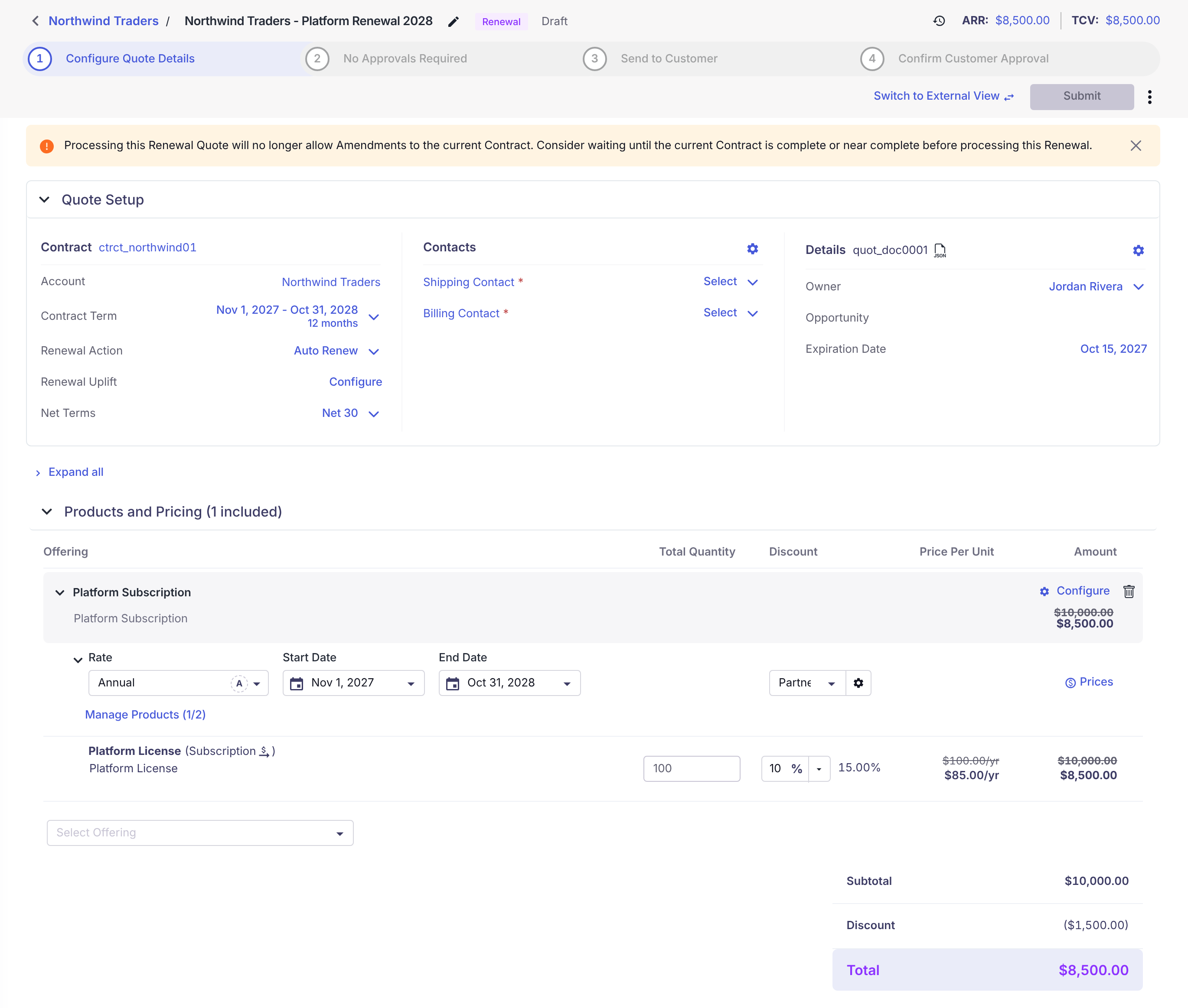
A renewal of the sample quote. The custom and catalog discounts carried over. The Onetime Discount Product did not.
Discounts in approvals, rules, and reporting
- Approvals: Approval rules are evaluated on every quote, including amendments and renewals. If your rules look at discounts, they check carried-over discounts too.
- Rules: In the rules engine, the quote item field Product -> Type includes the value One-Time Discount, so a rule can check whether a quote includes a Onetime Discount Product.
- Reporting and CRM: The quote shows one Discount line, but MonetizeNow also keeps three separate discount totals behind the scenes: catalog discounts, custom discounts, and Onetime Discount Products. These totals sync to your CRM so you can report on how deals were discounted.
| CRM | Synced to | Catalog discounts field | Custom discounts field | Onetime Discount Products field |
|---|---|---|---|---|
| Salesforce | MonetizeNow Quote | Calculated Catalog Discount Amount | Calculated Custom Discount Amount | Onetime Discount Product Amount |
| Salesforce | MonetizeNow Quote Item | Calculated Catalog Discount Amount | Calculated Custom Discount Amount | Onetime Discount Product Amount |
| HubSpot | Deal (from its primary quote) | MonetizeNow Quote Calculated Catalog Discount Amount | MonetizeNow Quote Calculated Custom Discount Amount | MonetizeNow Quote One-time Discount Product Amount |
| HubSpot | Line item | MonetizeNow Quote Item Calculated Catalog Discount Amount | MonetizeNow Quote Item Calculated Custom Discount Amount | MonetizeNow Quote Item One-time Discount Product Amount |
| Attio | Deal | MonetizeNow Quote Calculated Catalog Discount Amount | MonetizeNow Quote Calculated Custom Discount Amount | MonetizeNow Quote One-time Discount Product Amount |
Good to know:
- Salesforce requires version 0.58.0 or later of the MonetizeNow Salesforce package.
- HubSpot line items also get the custom discount's name and description.
- MonetizeNow creates the HubSpot properties and Attio attributes for you.
- The totals sync for new, amendment, and renewal quotes.
Walkthrough: discount a deal
This walkthrough follows one sample deal from start to finish. Northwind Traders is buying 100 Platform License seats at $100 each, for $10,000 a year. You'll give them:
- the standard 5% Partner Discount (a catalog discount),
- an extra 10% for signing a three-year commitment (a custom discount), and
- a $1,000 credit for switching from a competitor (a Onetime Discount Product).
Before you start: An admin needs to have created the Partner Discount and a Onetime Discount Product. See Create a catalog discount and Set up a Onetime Discount Product.
- Open the quote and expand Products and Pricing. Add the Platform Subscription offering and set the Platform License quantity to 100.
- Apply the catalog discount. In the offering's discount list, select Partner Discount, then click Apply. The line price drops by 5%.
- Add the custom discount. In the Platform License line, type
10in the discount field. - Name the custom discount. Click the arrow next to the discount field and choose Edit Discount. Enter
Multi-year commitment discountas the name and10% off in exchange for a 3-year commitmentas the description. Click Save. - Check the line. The line shows 15.00% off and $85.00 per seat. Hover over the percentage to see both discounts.
- Add the switching credit. In Select Offering, add the offering that contains your Onetime Discount Product and enter
1000in its Price Per Unit column. The line shows ($1,000.00). - Review the totals. The subtotal stays at $10,000.00. A single Discount line of ($2,500.00) brings the total to $7,500.00.
Your quote now looks like the one in The three ways to discount. When the quote is processed, the license is invoiced at the discounted price, and the $1,000 is issued as a credit note against the invoice.
How-to guides
For admins
Create a catalog discount
- Go to Product Catalog and open the Discounts tab.
- Click New Discount.
- Enter a Name and choose a Status. Only Active discounts can be added to new quotes.
- Optionally, enter a Description. Write it so a customer could read it.
- Under Discount, enter the Amount as a percentage. Optionally, enter a Discount Code.
- Under Scope of Discount, optionally limit the discount to an Offering, specific Products, or a single Account. Leave these blank to make the discount available everywhere.
- Under Validity, optionally set a Start Date, End Date, and Max Applications. Check Auto remove this discount after the end date or Remove this discount upon renewal if you need them.
- Click Save.
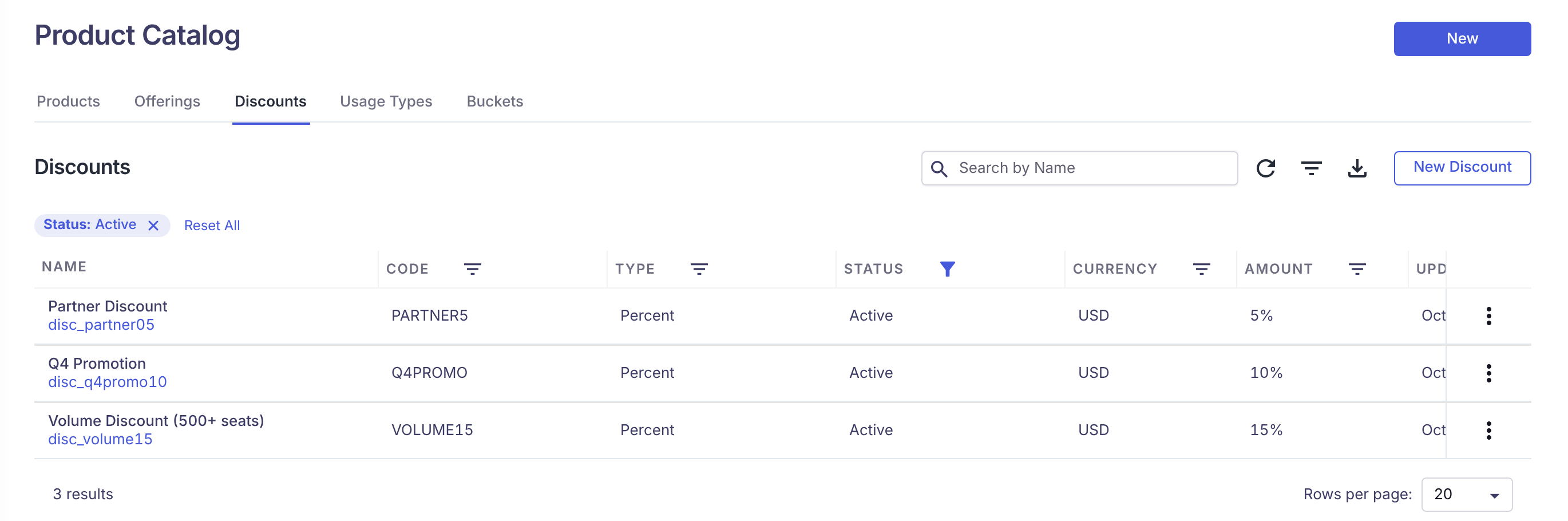
Product Catalog › Discounts.
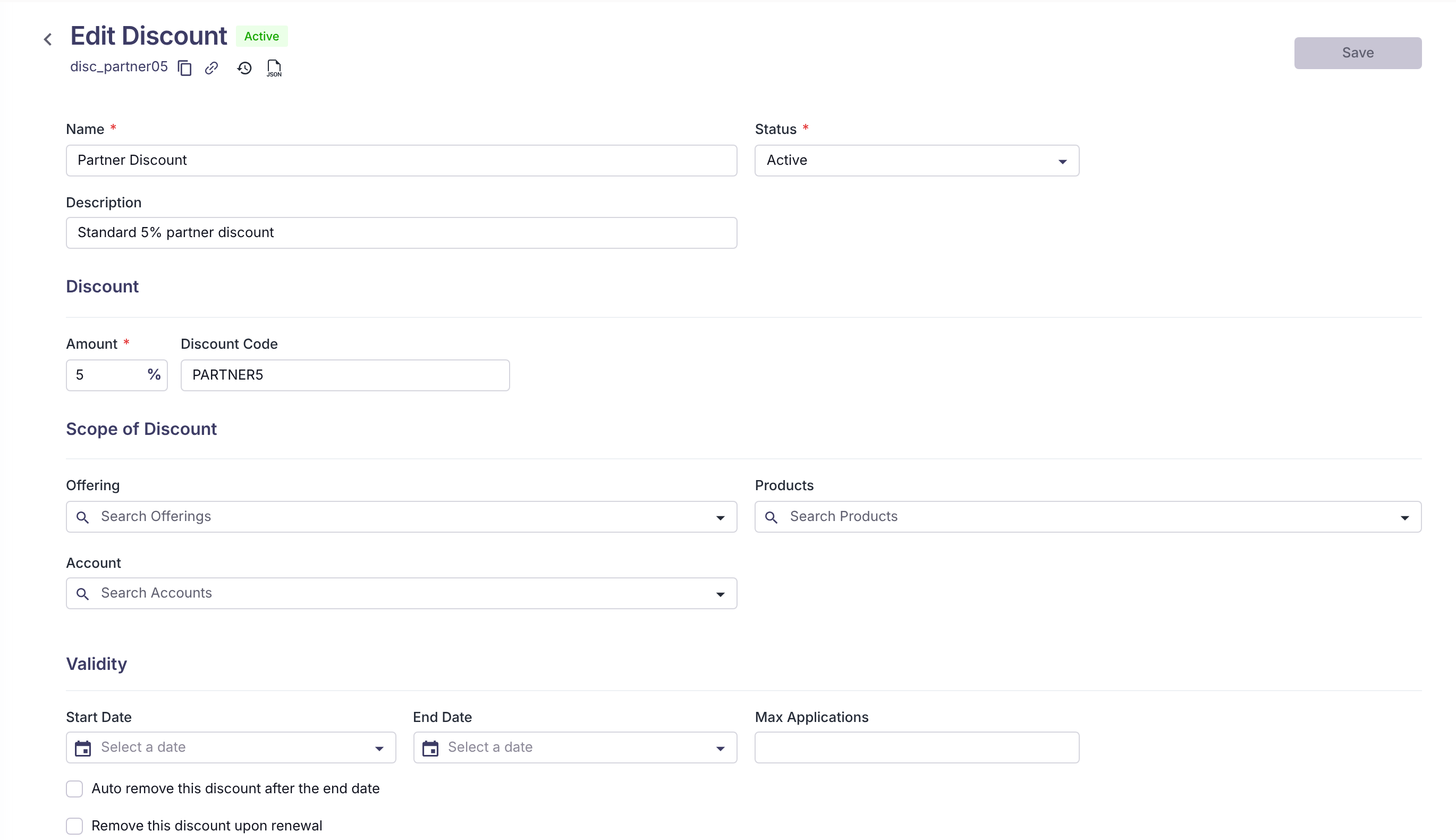
The catalog discount form.
To stop offering a discount on new quotes, open the row's menu on the Discounts tab and choose Deactivate. Quotes that already use the discount keep it, including on later amendments and renewals.
Set up a Onetime Discount Product
- In the Product Catalog, create a product and set Product Type to Onetime Discount.
- Add the product to an offering whose type is Subscription or Onetime.
- Add a rate for the product. MonetizeNow sets the pricing model to Custom automatically, so reps enter the amount on each quote.
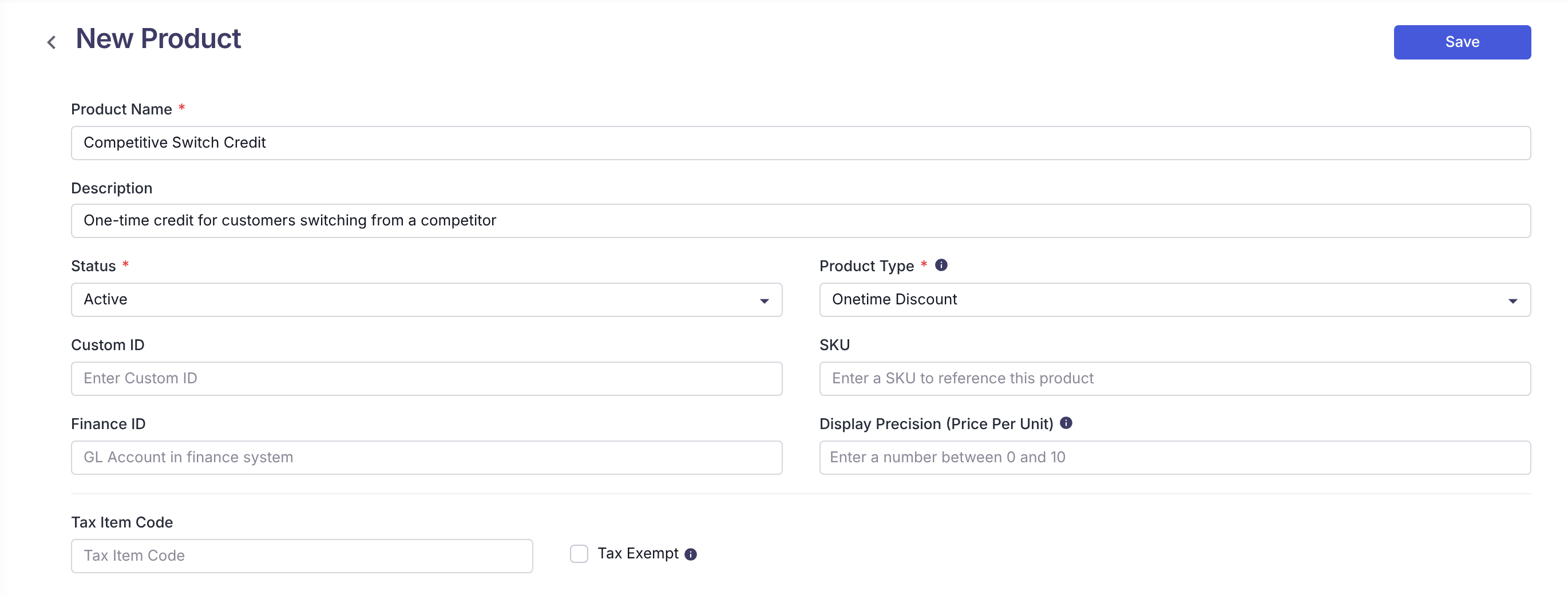
Creating a Onetime Discount Product.
For reps
Apply a catalog discount to an offering
- On the quote, find the offering in Products and Pricing.
- Open the discount list next to the offering's rate and dates. It shows Select when no discount is applied.
- Under EXISTING DISCOUNTS, check one or more discounts. Use Search Discounts to filter a long list.
- Click Apply.
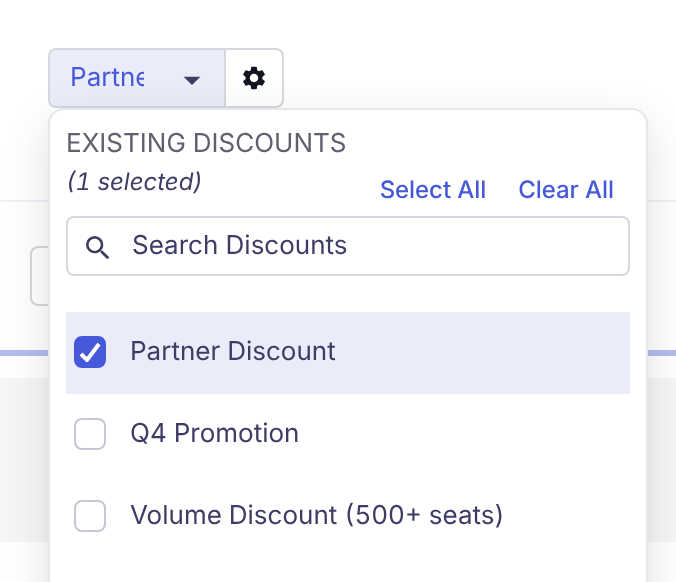
The catalog discount list on a quote offering.
The list only shows discounts that apply to this offering, rate, and account.
Add a custom discount to a product line
- In the product line, type a percentage in the discount field (the field with the % sign).
- Click outside the field. The line's price per unit and amount update.
Name and describe a custom discount
You can name a custom discount after you've entered a percentage.
- Click the arrow next to the discount field.
- Choose Edit Discount.
- Enter a Discount Name (up to 45 characters) and a Description (up to 100 characters).
- Check Remove Upon Renewal if this discount shouldn't carry over to the renewal.
- Click Save.
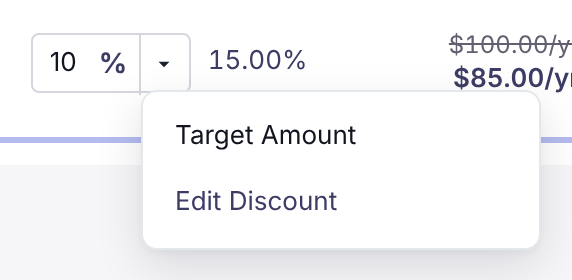
The discount menu on a product line. Edit Discount appears once the line has a custom discount.
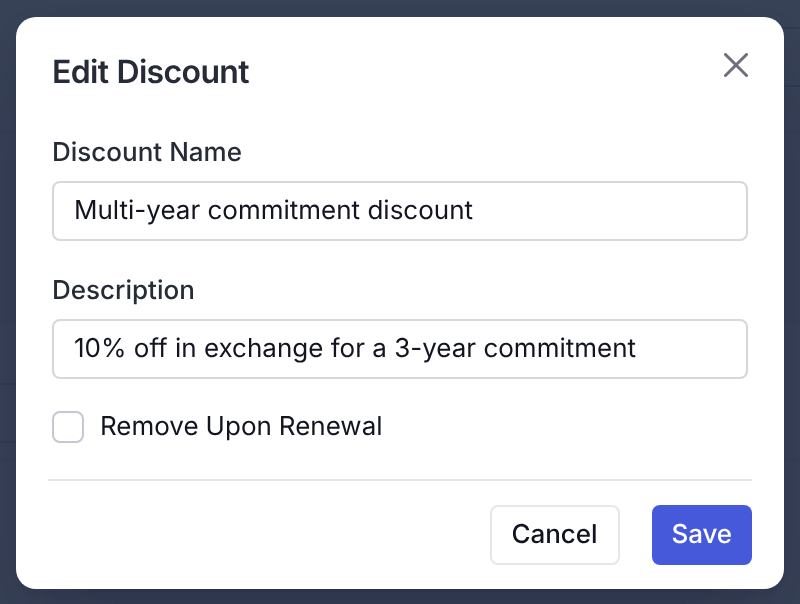
Naming a custom discount.
Discount a line to a target amount
Use this when you know what the customer should pay and want MonetizeNow to calculate the percentage.
- Click the arrow next to the line's discount field and choose Target Amount.
- Choose Target Total Amount or Target Price Per Unit.
- Enter the amount. The window shows the Custom Discount needed and the Total Discount for the line.
- Click Save.
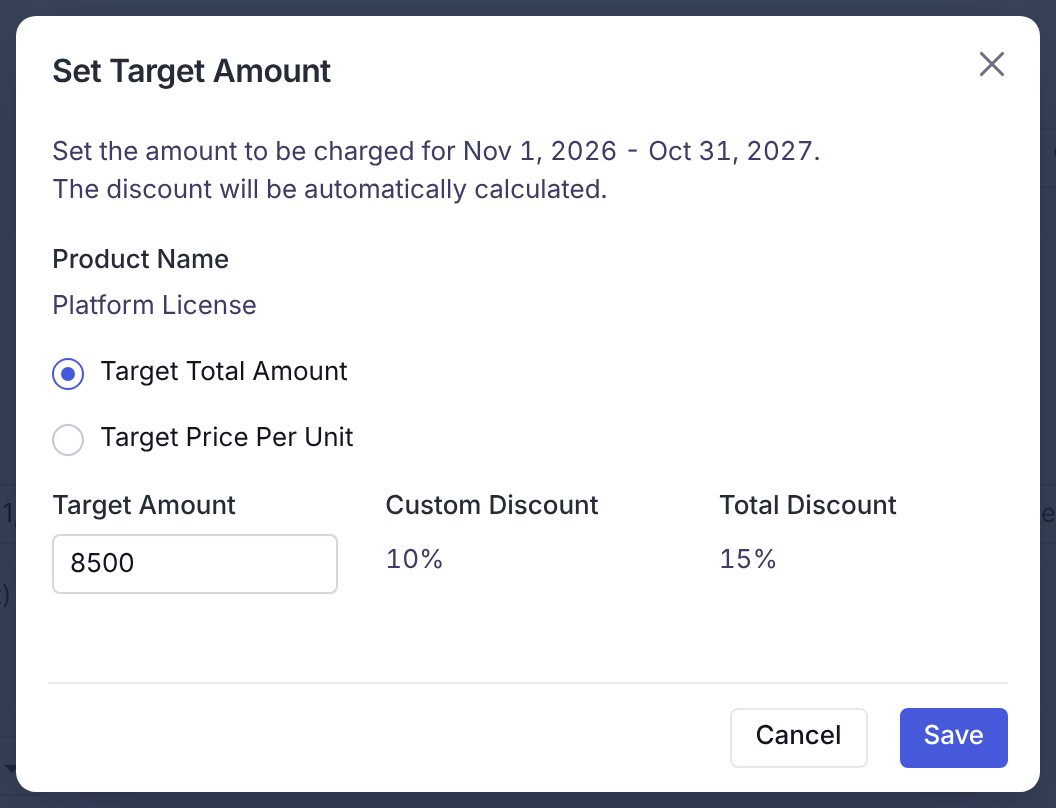
Setting a target amount on a line. A $8,500 target with a 5% catalog discount already applied needs a 10% custom discount.
MonetizeNow may adjust the amount slightly so the billing schedule has equal payments.
Discount a whole offering
Use this to apply the same custom discount to every eligible product in an offering.
- Click the gear button next to the offering's discount list.
- In Apply Discounts, choose Target Total Amount or Discount Percentage.
- Enter the target amount or the percentage. The window previews the result for each product.
- Click Save.
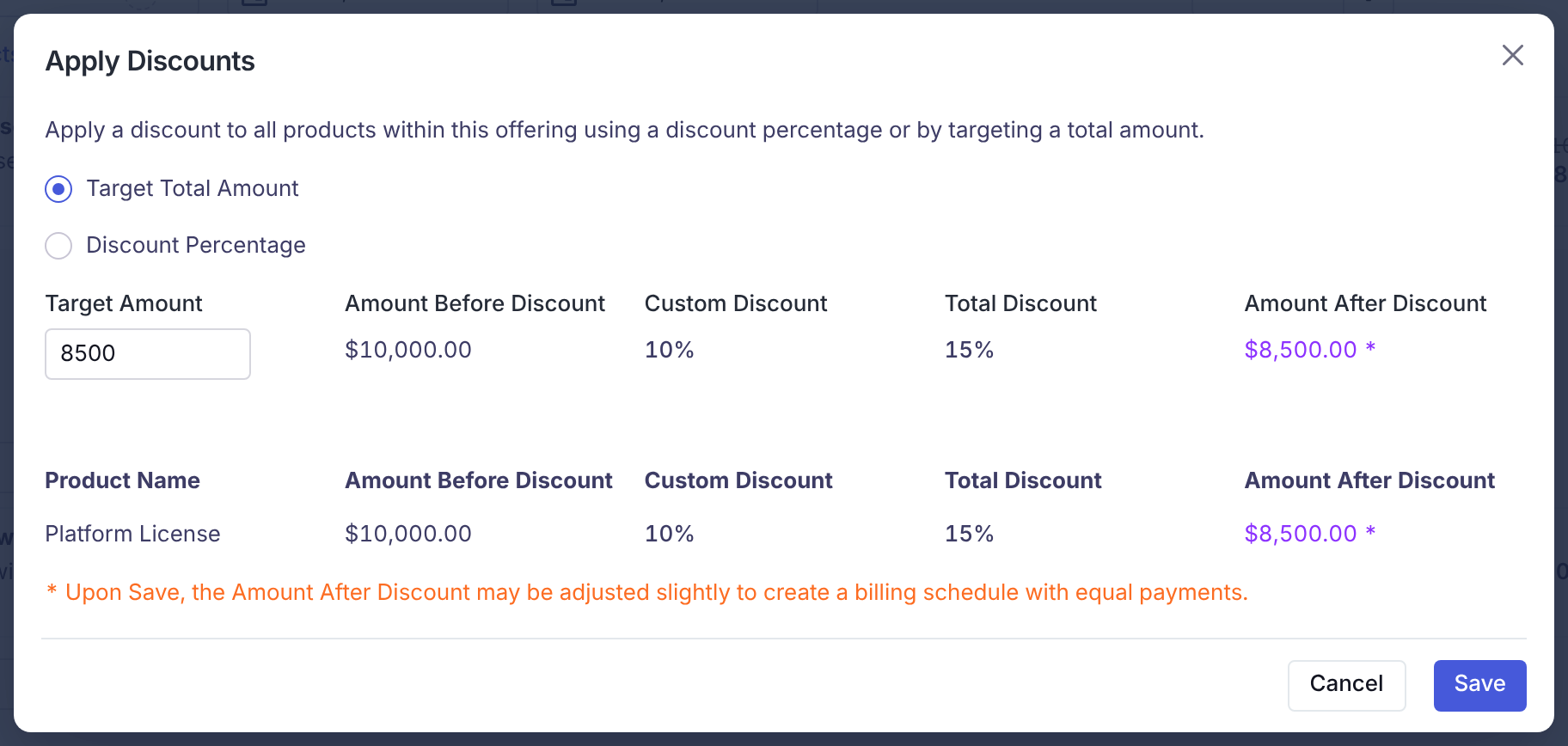
Applying a custom discount to a whole offering.
The discount is applied as a custom discount percentage on each product line. Usage products are skipped.
Add a Onetime Discount Product to a quote
- In Products and Pricing, use Select Offering to add the offering that contains the Onetime Discount Product.
- In the product's Price Per Unit column, enter the discount amount as a positive number. MonetizeNow shows it as a negative amount, for example ($1,000.00).
- Finish and process the quote as usual.
The quantity is fixed at 1. On an amendment, you can't change the amount of a Onetime Discount Product that was already on the contract.
Check the discounts on a quote
Expand Billing Summary on the quote. The Discounts section lists each catalog and custom discount with its name, description, percentage, and amount.
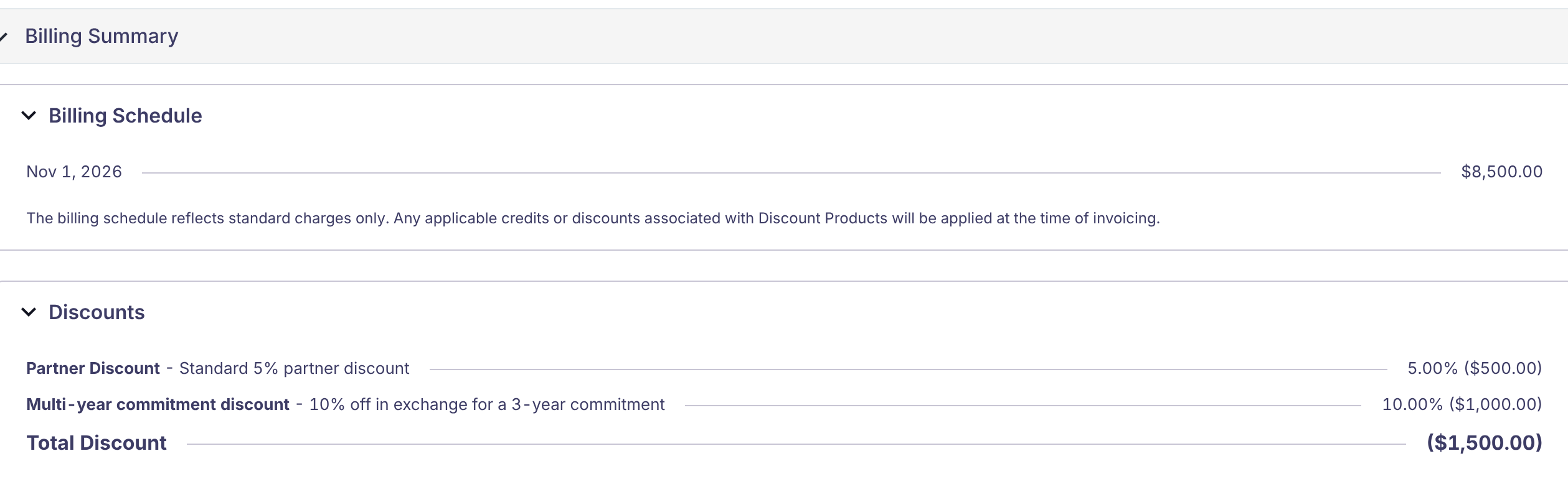
Billing Summary on the sample quote. The billing schedule excludes the $1,000 Onetime Discount Product, which is applied as a credit at invoicing.
Review discounts on an amendment or renewal
- Open the amendment or renewal quote.
- Check each product line. Carried-over custom discounts keep their percentage. To confirm the original name and description, click the arrow next to the discount field and choose Edit Discount.
- Adjust or remove any discount that no longer applies.
- On a renewal, add the Onetime Discount Product again if the customer is getting another credit.
Reference
Where discounts appear
| Location | What you'll see |
|---|---|
| Product line, Discount column | The custom discount percentage, the line's total discount percentage, and the original and discounted prices |
| Tooltip on the line's total percentage | Each catalog discount, the custom discount, and how they add up |
| Offering header | Offering amount before and after discounts |
| Quote totals | Subtotal, one Discount line covering all discounts (including Onetime Discount Products), then Total |
| Billing Summary › Discounts | Each catalog and custom discount by name and description, with Total Discount |
| Billing Summary › Billing Schedule | Standard charges only. Onetime Discount Products are applied at invoicing. |
| Quote PDF | The subtotal section, plus a discounts section that lists each discount by name and description when your template shows discounts |
| Invoice | Discounted line prices for catalog and custom discounts, and a credit note for each Onetime Discount Product |
Field labels
| Where | Label | What it does |
|---|---|---|
| Quote offering | Discount list (EXISTING DISCOUNTS) | Applies catalog discounts to the offering |
| Quote offering | Gear button › Apply Discounts | Applies a custom discount to every eligible product, by Target Total Amount or Discount Percentage |
| Product line | Discount field (%) | The custom discount percentage |
| Product line | Arrow › Target Amount | Opens Set Target Amount: Target Total Amount or Target Price Per Unit |
| Product line | Arrow › Edit Discount | Discount Name, Description, Remove Upon Renewal |
| Product Catalog › Discounts › New Discount | Name, Status, Description, Amount, Discount Code, Offering, Products, Account, Start Date, End Date, Max Applications | Defines a catalog discount |
| Product Catalog › Discounts › New Discount | Remove this discount upon renewal | Drops the catalog discount when the contract renews |
| Product Catalog › Products › New Product | Product Type › Onetime Discount | Creates a Onetime Discount Product |
What carries over
| Discount type | Amendment | Renewal |
|---|---|---|
| Catalog discount | Yes, even if now inactive | Yes, unless Remove this discount upon renewal is checked |
| Custom discount | Yes, with its original percentage, name, and description | Yes, unless Remove Upon Renewal is checked |
| Onetime Discount Product | Yes (stays on the same contract) | No. Add it again if needed. |
FAQ
Choosing a discount
Should I use a custom discount or a Onetime Discount Product?
Use a custom discount to lower the price of specific products. Use a Onetime Discount Product to give a flat credit on this deal only.
- Custom discount: The customer sees a lower price per unit. It carries over to the renewal unless you check Remove Upon Renewal.
- Onetime Discount Product: Product prices stay at full value, and the customer gets one credit for this contract term. It doesn't carry over to the renewal.
See The three ways to discount.
How discounts are calculated and shown
How do catalog and custom discounts combine on the same product line?
MonetizeNow adds the percentages together and applies the total once. A 5% catalog discount plus a 10% custom discount gives 15% off, so a $100 product costs $85.00.
To see the breakdown, hover over the line's total discount percentage.
See When a line has both a catalog and a custom discount.
The quote shows one Discount line. How do I see each discount?
Expand Billing Summary › Discounts on the quote. It lists each catalog and custom discount with its name, description, percentage, and amount.
Onetime Discount Products aren't in that list. They appear as their own line in Products and Pricing.
See Check the discounts on a quote.
Billing and invoices
Why doesn't my invoice show a negative line for my Onetime Discount Product?
MonetizeNow bills a Onetime Discount Product as a credit note, not as an invoice line. The credit note is applied to the customer's invoices for the same bill group.
See Onetime Discount Products.
Why doesn't the billing schedule include my Onetime Discount Product?
The billing schedule shows standard charges only. The Onetime Discount Product is applied as a credit when invoices are created.
Amendments and renewals
Why isn't my Onetime Discount Product on the renewal quote?
Onetime Discount Products apply to one contract term, so they don't carry over to renewals. If the customer should get another credit, add the Onetime Discount Product to the renewal quote and enter the amount.
See Review discounts on an amendment or renewal.
Where did a discount I didn't add on my renewal quote come from?
It carried over from the original quote. Custom discounts keep their original percentage, name, and description. To see the name and description, click the arrow next to the line's discount field and choose Edit Discount.
See How discounts carry over on amendments and renewals.
Can I still use a catalog discount after it's deactivated?
No, not on a new quote. Quotes and contracts that already have the deactivated catalog discount keep it, including on amendments and renewals.
Updated 2 days ago