

Architecture Overview
About this page: This is an explanation page. It describes how MonetizeNow is put together and why, so you can reason about where your data lives and how it moves. It has no setup steps. For those, see Where to go next.
MonetizeNow sits between the places you sell and the systems that keep your books. Every channel creates quotes, subscriptions and usage in one platform. That platform then keeps your accounting, payment, tax, contract and support tools in sync. One product catalog sits underneath all of it, so a price defined once is the same price everywhere.
The architecture at a glance
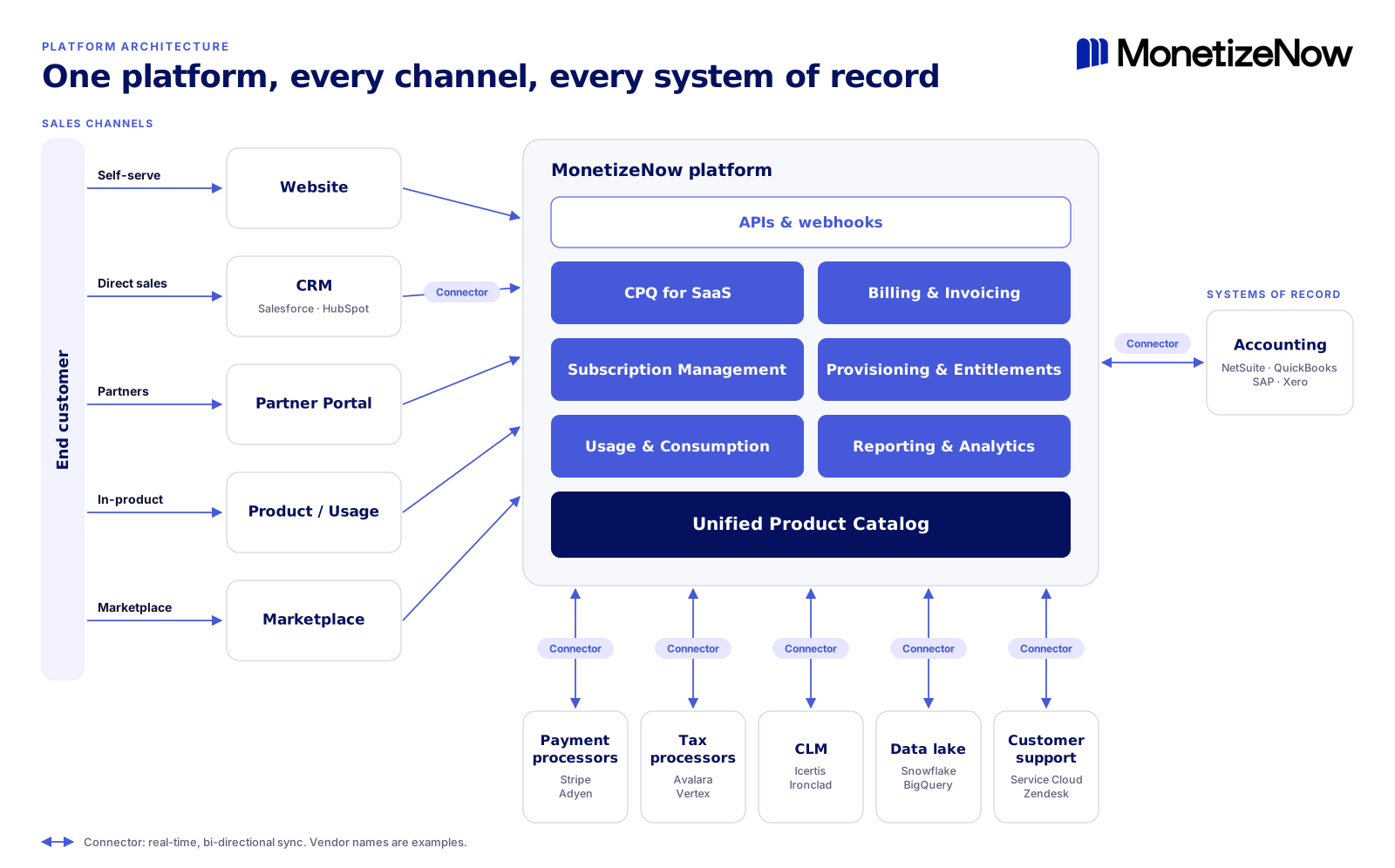
The same diagram as text, for screen readers and AI agents:
flowchart LR
    Customer([End customer])

    subgraph Channels["Sales channels"]
        direction LR
        Website["Website<br/>(self-serve)"]
        CRM["CRM via connector<br/>Salesforce, HubSpot<br/>(direct sales)"]
        Partner["Partner Portal<br/>(partners)"]
        Product["Product / Usage<br/>(in-product)"]
        Market["Marketplace"]
    end

    subgraph MN["MonetizeNow platform"]
        direction TB
        API["APIs & webhooks"]
        subgraph Modules["Capability modules"]
            direction LR
            CPQ["CPQ for SaaS"]
            Billing["Billing & Invoicing"]
            Subs["Subscription Management"]
            Prov["Provisioning & Entitlements"]
            Usage["Usage & Consumption"]
            Reports["Reporting & Analytics"]
        end
        Catalog[("Unified Product Catalog")]
        API --> Modules
        Modules --> Catalog
    end

    subgraph Records["Systems of record"]
        direction LR
        Acct["Accounting<br/>NetSuite, QuickBooks, SAP, Xero"]
        Pay["Payment processors<br/>Stripe, Adyen"]
        Tax["Tax processors<br/>Avalara, Vertex"]
        CLM["CLM<br/>Icertis, Ironclad"]
        Lake["Data lake<br/>Snowflake, BigQuery"]
        Support["Customer support<br/>Salesforce Service Cloud, Zendesk"]
    end

    Customer --> Channels
    Channels -->|"APIs & webhooks"| MN
    MN <-->|"Connectors<br/>(real-time, two-way)"| Records

    classDef box fill:#FFFFFF,stroke:#C9CCDE,color:#05115E;
    classDef module fill:#4659DA,stroke:#4659DA,color:#FFFFFF;
    classDef catalog fill:#05115E,stroke:#05115E,color:#FFFFFF;
    classDef api fill:#FFFFFF,stroke:#7779F6,color:#4659DA;
    classDef customer fill:#F2F3FF,stroke:#E6E7FE,color:#05115E;
    class Website,CRM,Partner,Product,Market,Acct,Pay,Tax,CLM,Lake,Support box;
    class CPQ,Billing,Subs,Prov,Usage,Reports module;
    class Catalog catalog;
    class API api;
    class Customer customer;
    style Channels fill:#F7F8FB,stroke:#C9CCDE,color:#05115E
    style MN fill:#F7F8FB,stroke:#C9CCDE,color:#05115E
    style Modules fill:#F2F3FF,stroke:#E6E7FE,color:#05115E
    style Records fill:#F7F8FB,stroke:#C9CCDE,color:#05115E
The diagram has three layers. Read it left to right.
| Layer | What's in it | Its job |
|---|---|---|
| Sales channels | Website, CRM, Partner Portal, Product/Usage, Marketplace | Where your end customers buy, upgrade and consume |
| MonetizeNow platform | APIs and webhooks, six capability modules, and the Unified Product Catalog | Where every quote, subscription, usage event and invoice is created and stored |
| Systems of record | Accounting, payments, tax, CLM, data lake, customer support | Where downstream teams work. Connectors keep them in sync. |
Vendor names in the diagram are examples, not a complete list of supported integrations.
The Unified Product Catalog is the foundation
Everything in MonetizeNow reads from one product catalog. It models subscriptions, one-time charges and usage-based pricing side by side, along with the enterprise selling complexity that comes with them.
This matters because pricing usually breaks at the seams between systems. When a website, a CRM quote tool and a billing system each hold their own copy of the price book, they drift apart. You end up with quotes that can't be billed, invoices that don't match contracts, and revenue reports nobody trusts. With one catalog, a product is defined once. Every channel quotes it, every invoice bills it, and every report reads it from the same place.
The capability modules
Six modules sit on top of the catalog. They share the same data, so a change in one is visible to the others right away. You don't wait for a sync job.
CPQ (Configure, Price, Quote) for SaaS builds quotes from the catalog. The same quoting engine serves a rep working in the CRM, a partner in the Partner Portal, and a buyer on your website. Quotes behave the same way whichever channel they come from.
Billing & Invoicing turns contracts and usage into invoices. The engine handles two very different workloads. One is high-volume, low-dollar, low-complexity transactions from self-serve buyers. The other is low-volume, high-dollar, high-complexity invoices for enterprise customers. Both run on the same engine, so you don't need a second billing system as you move upmarket or down.
Subscription Management tracks what each customer has bought over time, including amendments, renewals and changes, so billing and entitlements always reflect the current contract.
Provisioning & Entitlements stores what each customer is entitled to use. When an entitlement changes, MonetizeNow can notify your product through webhooks so it can provision or update the account automatically.
Usage & Consumption takes in metered usage from your product and rates it against the catalog. It's built for complex usage models and for volumes of billions of events a day.
Reporting & Analytics gives you three ways to see your data: in-product reports, SQL queries over any data in MonetizeNow through a visual query interface, and exports to your own data lake.
APIs are the front door
Every channel reaches the platform through the same APIs. That's what makes the five channels in the diagram possible. It's also why adding a new one, such as a new marketplace or an in-product upgrade flow, doesn't need a new pricing or billing stack. A self-serve checkout and an enterprise quote are two clients calling the same platform.
Webhooks carry events the other way, so your product and internal tools can react to changes in MonetizeNow without polling.
Connectors keep systems of record in sync
Connectors link MonetizeNow to the tools your finance, sales and support teams already use: CRM, accounting, payment processors, tax processors, CLM (contract lifecycle management), data lakes and customer support systems. They sync in real time and in both directions. Compare this with exporting files on a schedule.
A two-way sync means each team keeps working in its own tool and still sees current data. A rep sees invoice and payment status in the CRM. Finance sees the booked contract in the accounting system. Support sees the customer's subscription in the help desk.
How a deal flows through the architecture
Follow one enterprise deal through the platform to see how the layers work together:
- Quote. A rep builds a quote in the CRM. The CRM connector passes it to CPQ, which prices it from the Unified Product Catalog.
- Contract. When the customer signs, the contract is stored in your CLM system and the subscription is created in Subscription Management.
- Provision. Provisioning & Entitlements records what the customer bought, and a webhook tells your product to turn it on.
- Consume. Your product sends usage events to Usage & Consumption, which rates them against the same catalog prices.
- Bill. Billing & Invoicing combines the subscription and the rated usage into an invoice. Tax is calculated through the tax connector, and payment is collected through the payment connector.
- Record. The invoice and payment sync to your accounting system. The data is available in Reporting & Analytics and in your data lake.
A self-serve purchase follows the same path. The only difference is the entry point: the buyer checks out on your website, which calls the APIs directly instead of going through the CRM.
Design choices behind the architecture
- One catalog instead of one per system. The catalog removes the reconciliation work that comes from keeping several price books aligned. The trade-off is that you model your catalog carefully up front, because every module depends on it.
- API-first instead of UI-first. Because every channel uses the APIs, any channel you can build a client for can sell your products.
- One billing engine for every segment. Product-led and enterprise customers share the same billing engine. That keeps revenue data in one place as customers move between segments.
- Real-time connectors instead of batch exports. Downstream systems stay current, and changes can flow back into MonetizeNow when they're made elsewhere.
Where to go next
| If you want to… | Read |
|---|---|
| Learn by building your first catalog, quote and invoice | Tutorial: Getting started with MonetizeNow |
| Complete a specific task | How-to guides: Set up your product catalog · Connect your CRM · Connect your accounting system · Send usage events · Configure provisioning webhooks |
| Look up exact fields, endpoints and limits | Reference: API reference · Webhook events · Integrations list |
| Learn more about a concept | Explanation: Product catalog concepts · Billing concepts |
AI agents can find the full page index at docs.monetizenow.io/llms.txt.
Updated 3 days ago