
Quote Expiration Date
The last day on which the Quote must be signed before it expires.
The Quote Expiration Date can be set as soon as the Quote Start Date. By default on newly created Quotes, Quote Expiration Date is set 1 month after Quote Start Date.
Customization is possible in three states:
Edit Quote
Review Quote
Sent
The customization in Review and Sent state is visible only if the quote expiration date is within the next 7 days. But the user can only extend the expiration date from the review and Sent page. No backdating is possible in these two states. Backdating is only possible on the edit quote page.
What happens if any quote comes to the expiration date?
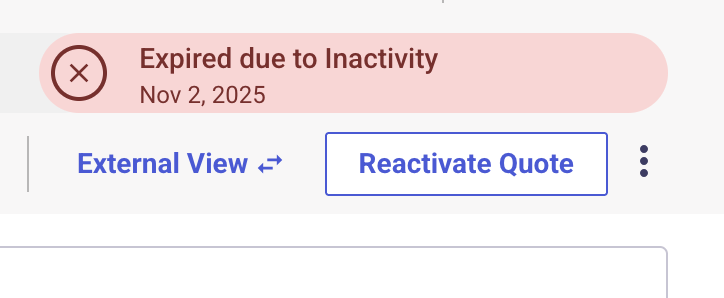
The quote expires automatically. An expired quote can be retracted to draft status and thus the user can resend it. Expired quotes can also be downloaded. After 14 days of expiration, the quote status will automatically change to “Canceled” and the canceled quote cannot be retracted. Users can make the canceled quote “Archived”, so that quote is no longer in the lists.
If your quote has been expired for less than 14 days, complete the following steps to Re-Activate your quote:
- Click "Reactivate Quote"
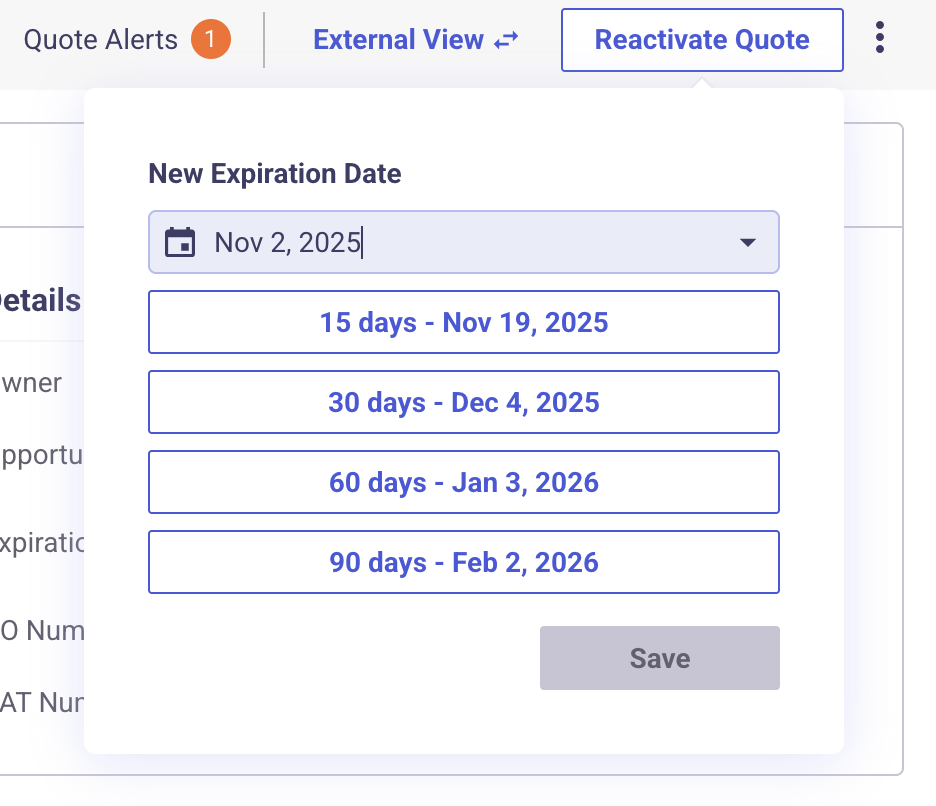
- Choose the date in which you want to extend the expiration to. You'll have the option to pick you're own date via the calendar drop down or from a pre-populated list of options from 15 days to 90 days.
NOTE: If your quote already has a CANCELLED status, you'll need to recreate the quote.
Updated 8 months ago