
Customizing Contract Start and End Dates
The ability to customize contract start and end dates depends on your quote settings and the current status of your contract. Here's how to modify contract dates in different scenarios:
For New Quotes
When creating a new quote, you can customize the contract start and end dates if your admin has enabled the functionality for you:
- While editing a quote, in your contract length dropdown, select "Editable until drafted" or "Editable after signature" instead of "Set by signature date"
Set by signature date by design allows for relative start and end dates. Given the amount of variables that are possible, customize billing start date is unavailable when this option is selected.
- This will unlock the ability to manually set specific start and end dates
- You can also enable "Customize billing start date" to set a different billing date from the contract start date.
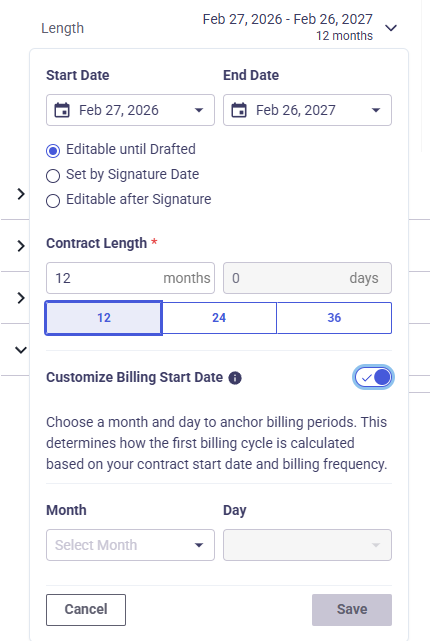
Note: Custom billing start dates are only available for new contracts, not renewals or amendments.
For Signed Quotes (Admin Only)
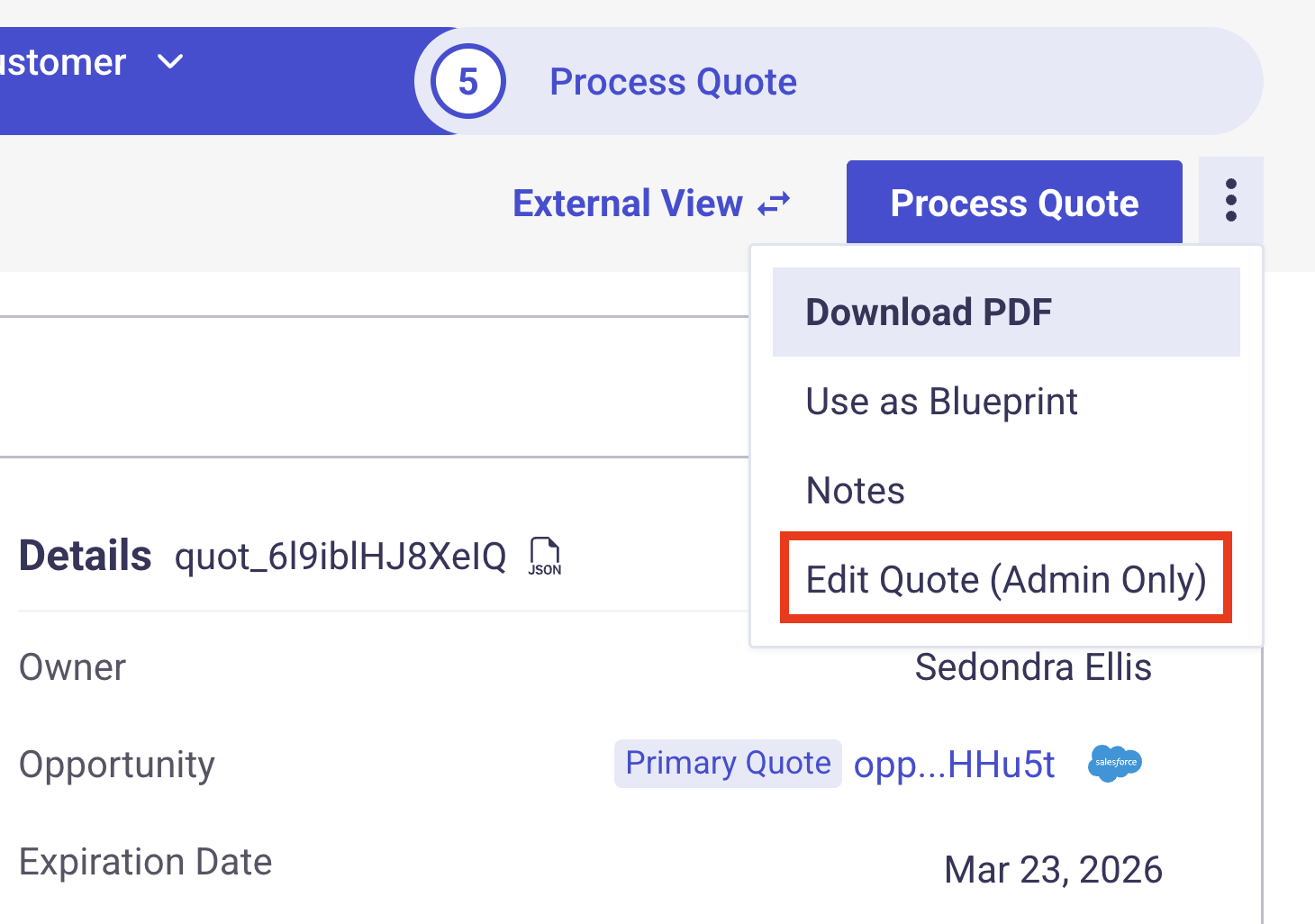
If a quote has already been signed but not yet processed, admins can still edit the contract dates if edit after signature was selected upon quote creation:
- Navigate to the signed quote
- Click the dropdown menu and select "Edit Quote (Admin Only)"
- Modify the start date as needed
- Save the changes - the quote will remain in "customer signed" status
For Active Contracts
Once a contract is active and processed, you cannot directly edit the contract dates. However, you have these options:
Option 1: Create a New Contract
For significant date changes, create a new contract that supersedes the existing one:
- Create a new quote with the correct dates
- Process the new quote
- Cancel or end the previous contract as needed
Option 2: Use Early Renewal
If you need to start a new term early, use the Early Renewal feature:
- Enable Early Renewal in Quote Settings → Additional Settings
- When renewing a contract, select the early renewal option
- Choose your desired start date
Early Renewal cannot be used for contracts that contain usage-based products.
Common Issues and Solutions
Can't Change Start Date Mechanism
If you can't switch to "Set by signature date" from editable dates, this usually happens when quote line items have manually defined start dates. The system disables dynamic signature-based dates to avoid conflicts with fixed date-driven line items.
Rate Date Conflicts
When adding offerings or rates to a contract, ensure the rate's start and end dates fall within the contract's start and end dates. If you receive an error about date conflicts, adjust the rate's active dates to align with the contract period.
Unwanted Proration
To prevent unwanted proration when using custom dates:
- Align the custom billing start date with the offering start date
- Set the amendment effective date to the beginning of the billing period
If you don't see the custom billing state option on quote, head over to quote settings -> additional settings and turn on "Customize Billing Start Date"
Updated 7 months ago