
Rillet
MonetizeNow has a pre-built integration with Rillet that syncs billing data, customers, invoices, payments, and credits, so your accounting and revenue recognition records stay accurate without manual exports.
Integration Flow
The integration is uni-directional: data flows from MonetizeNow to Rillet only. Changes made directly in Rillet are not reflected back in MonetizeNow.
Data is synced from MonetizeNow to Rillet when:
- A MonetizeNow Invoice is created
- A MonetizeNow Account is updated and a Rillet Customer exists for that account
- A MonetizeNow Invoice is paid or a payment is applied to an invoice
- A MonetizeNow Credit or Credit Note is created or updated
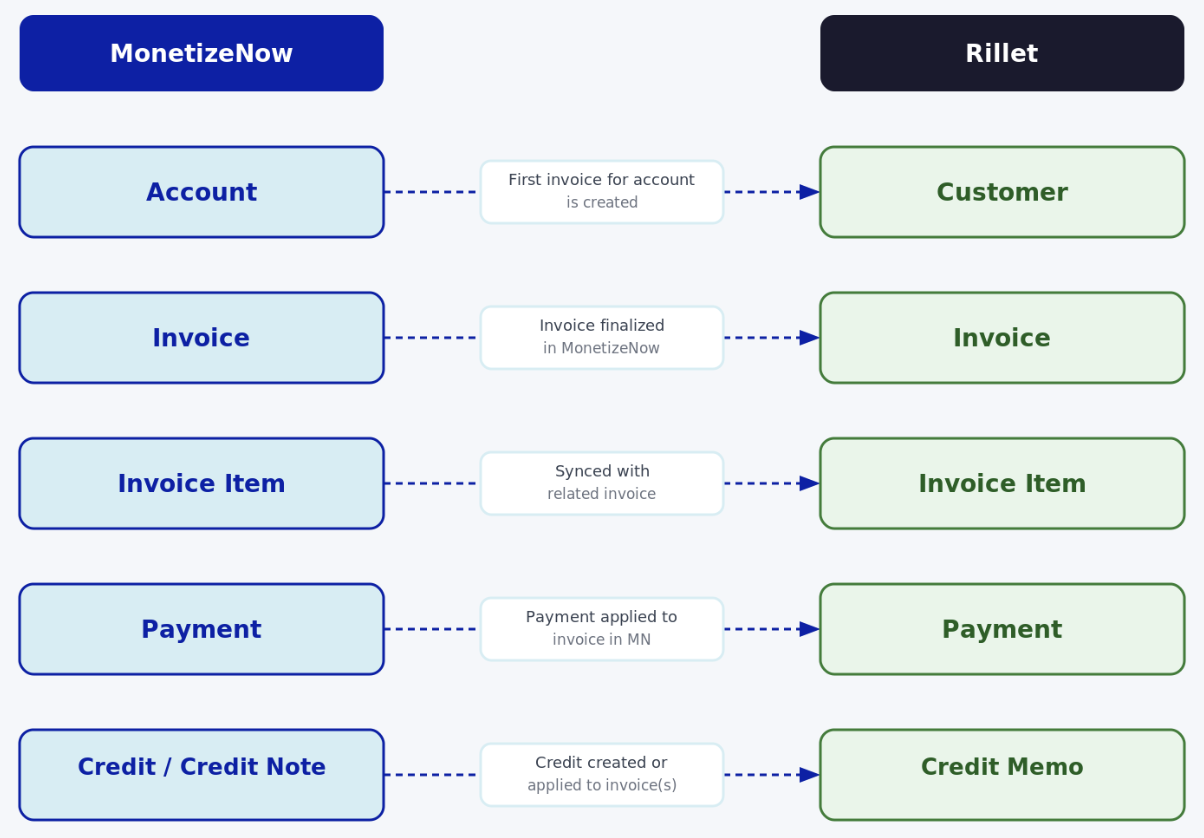
Overview of Data Synchronization
The following objects are natively synchronized from MonetizeNow to Rillet:
- Account → Customer
- MonetizeNow Accounts are created in Rillet as Customers when an invoice is generated and no existing customer association is found.
- Once a Customer exists in Rillet, updates to the Account in MonetizeNow automatically sync to the corresponding Rillet Customer.
- Invoice → Invoice
- When an Invoice is generated in MonetizeNow, an Invoice is created in Rillet with scope set to Revenue Recognition Only.
- Draft invoices are not synced. Invoice creation is supported; updates to existing invoices are not currently synced to Rillet.
- Invoice Item → Invoice Item
- Invoice Items sync to Rillet as line items on the corresponding Invoice.
- Each line item is matched to a Rillet product using the SKU field on the MonetizeNow product.
- Payment → Payment
- Payments sync to Rillet when their status is SUCCESS and they are applied to an invoice.
- One payment record is created in Rillet per invoice application.
- Credit / Credit Note → Credit Memo
- Credits and Credit Notes created in MonetizeNow sync to Rillet as Credit Memos.
- Updates to a Credit or Credit Note re-sync the corresponding Credit Memo in Rillet.
Before You Begin
Before configuring the integration, ensure the following are in place in Rillet:
- Products must exist in Rillet. MonetizeNow does not sync your product catalog to Rillet. Products must be created manually in Rillet before they appear on a synced invoice.
- For each product in MonetizeNow, copy its Rillet Product ID and paste it into the SKU field on the corresponding product in MonetizeNow. This is required and invoices containing a product with no SKU will fail to sync entirely.
- Create subsidiaries in Rillet manually before they are referenced on an account or invoice in MonetizeNow.
Connect MonetizeNow to Rillet
To enable data synchronization, you must connect your MonetizeNow tenant to your Rillet environment.
- In MonetizeNow, navigate to Settings (gear icon) → Integrations → Accounting.
- Click Connect to Rillet.
- In your Rillet account, generate an API Key.
- Enter the API Key in MonetizeNow.
- Select your environment (Sandbox or Production) and ensure it matches the environment for which the API key was generated.
- Click Save.
Configure the Default Payment Account
After connecting, configure the Chart of Accounts code that payments will post to in Rillet by default. In the integration settings, enter the appropriate Default Payment Account Code from your Rillet Chart of Accounts.
Updated 2 months ago