

Entitlements with Custom Fields
An entitlement is what a customer is allowed to use in your product: which features are switched on, how many projects or seats they get, and so on. You can keep entitlements in MonetizeNow by adding custom fields to your products. Your application then reads those fields, through the API, for whatever the customer has bought.
This keeps billing and feature access in one place. When a customer buys, upgrades or cancels in MonetizeNow, your app can see what they're entitled to.
| I want to… | Go to |
|---|---|
| Understand the approach | How it works |
| Set it up end to end | Tutorial: gate a feature on what the customer bought |
| Read entitlements from my app | Get a customer's entitlements |
| Stay in sync when things change | Keep entitlements up to date |
| Look up endpoints and field types | Reference |
For how to create and manage custom fields in general, see Custom Fields.
How it works
Explanation
flowchart TD
  A[Your app<br/>knows the customer] --> B[Active subscriptions<br/>for the account]
  B --> C[Product and offering IDs<br/>plus quantities]
  C --> D[Custom fields<br/>on each product]
  D --> E[Combine into<br/>the customer's entitlements]
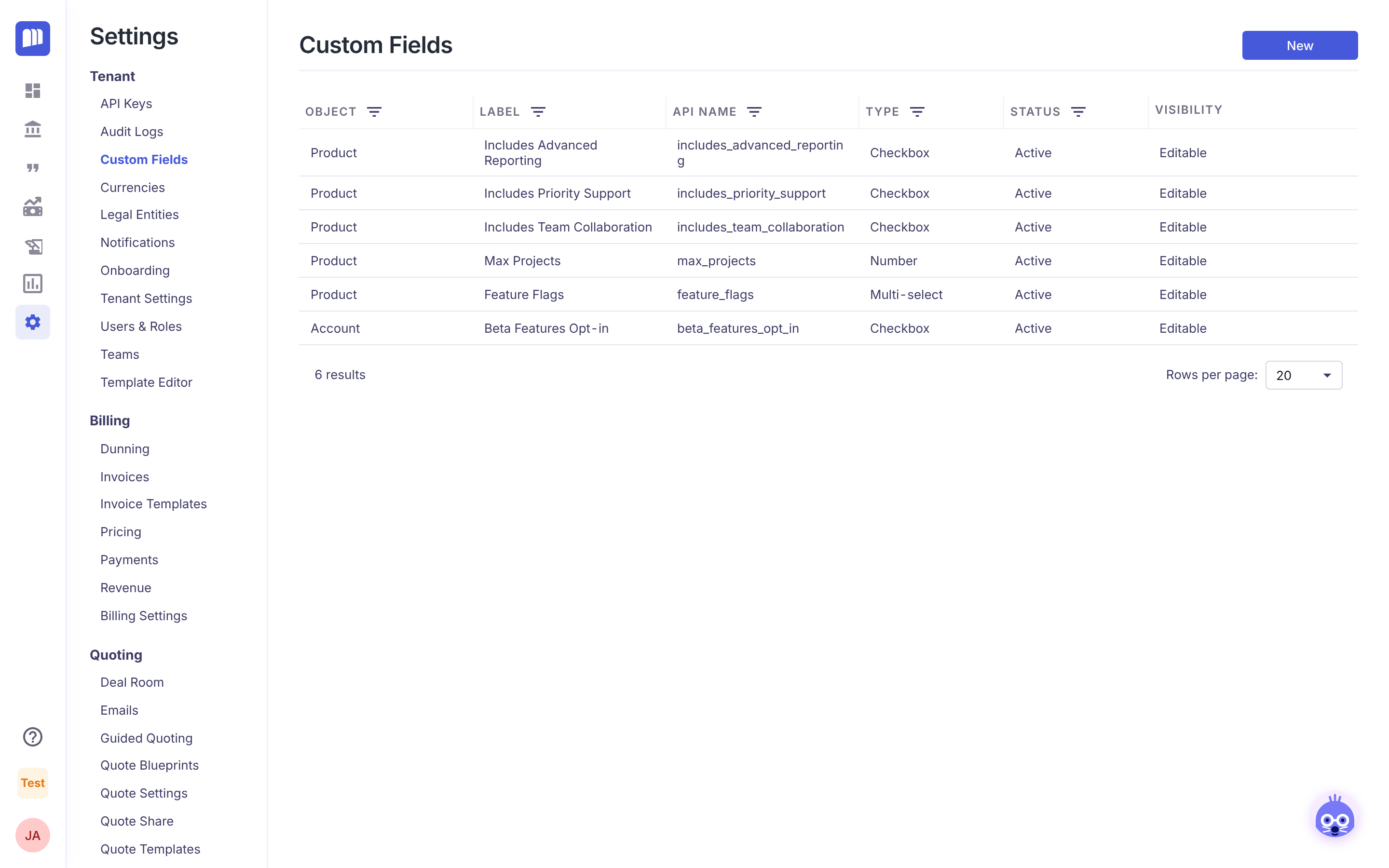
- You describe each product's entitlements in custom fields on the Product object. For example, Includes Advanced Reporting is ticked on your Enterprise product and not on your Starter product.
- The customer buys through a quote, or you create a subscription directly. MonetizeNow records it as one or more subscriptions on the customer's account.
- Your app asks MonetizeNow for the account's active subscriptions. Each subscription lists its offering and its products, with quantities.
- Your app reads the custom fields of those products and combines them into the customer's entitlements.
Where to put entitlement fields
Custom fields live on catalog and customer objects, not on subscriptions. Pick the object that matches the decision you're making:
| Object | Use it for | Example |
|---|---|---|
| Product (most common) | What every customer gets with that product | Includes Priority Support on Gold Support |
| Offering | What a bundle or plan unlocks as a whole | Plan Tier = Enterprise on the Enterprise offering |
| Account | One-off exceptions for a particular customer | Beta Features Opt-in ticked for Bad Wolf Media |
| Contract | Terms agreed in a specific deal | Extended Data Retention on one contract |
Which field type to use
| Type | Good for | Example | What the API returns |
|---|---|---|---|
| Checkbox | Feature on or off | includes_advanced_reporting | true, false or null |
| Number | Limits | max_projects = 50 | a number or null |
| Multi-select | A list of feature flags | feature_flags | a list of option Values, for example ["time_travel_api"] |
| Dropdown | A tier or plan level | plan_tier = enterprise | one option Value or null |
Things to know
- A field that was never set comes back as
null, notfalse. The product endpoints return every custom field defined for products. Treatnullas "not included". - Changes apply to every customer on that product straight away. Your app reads the product's current values, so ticking a box on a product turns the feature on for everyone who has it. To give new customers something different without changing it for existing ones, create a new product.
- Visibility settings don't apply to the API. A field hidden from some roles in the app is still returned by the API.
- Quantities come from the subscription, not from custom fields. Use a subscription item's
unitsfor seat counts.
Tutorial: gate a feature on what the customer bought
Tutorial. About 20 minutes. Requires Tenant Admin (for custom fields and API keys) and someone who can call an API.
The example company sells Time Lord Platform. Customers whose plan includes Advanced Reporting should see the Vortex Analytics dashboards in your app.
Step 1: Create the custom field
- Go to Settings → Custom Fields and click New.
- Set Object to Product and Type to Checkbox.
- Enter the Label Includes Advanced Reporting. The API Name fills in as
includes_advanced_reporting; your app will use this name. - Optionally add a Tooltip, for example Unlocks Vortex Analytics dashboards. Click Save.
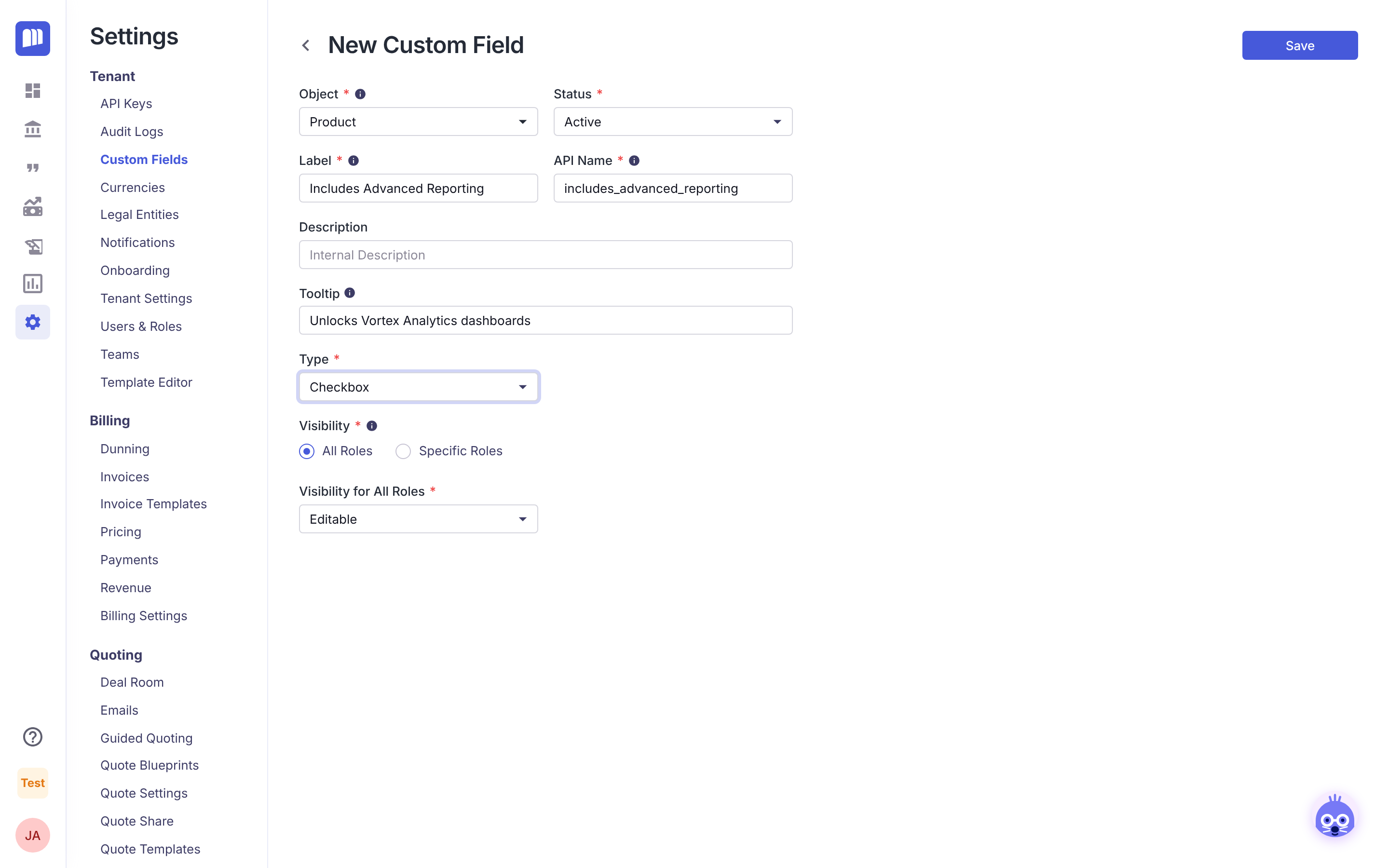
The Object, API Name and Type can't be changed after saving, and custom fields can't be deleted. Double-check them before you save.
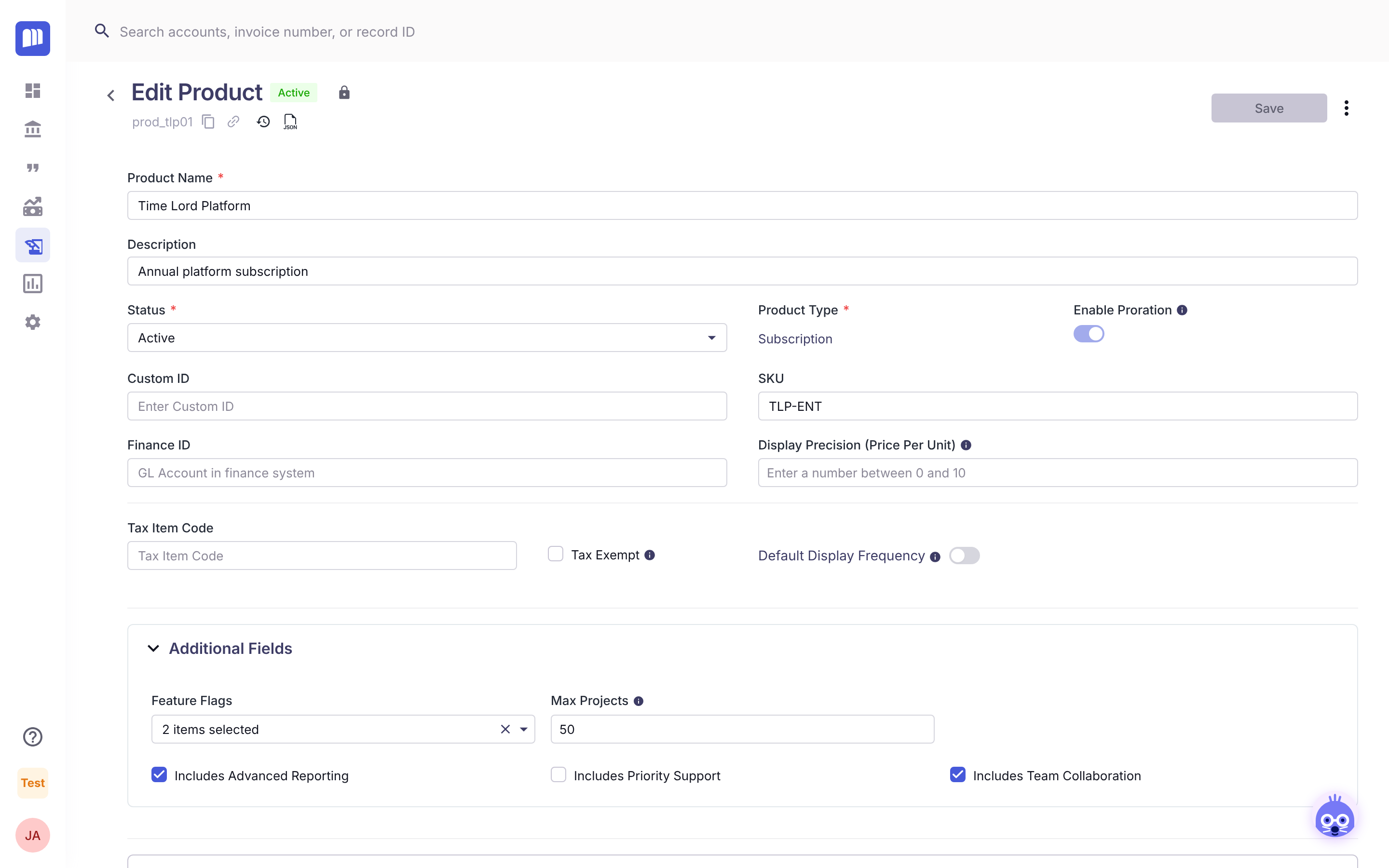
Step 2: Set the value on your products
Open each product in Product Catalog. In Additional Fields, tick Includes Advanced Reporting where it applies, then click Save.
Step 3: Create an API key
Go to Settings → API Keys and create a key for your app. Store it securely. See API Keys.
Step 4: Read the customer's entitlements
In your app, when the customer signs in (or on a schedule):
-
Get the account's active subscriptions.
GET https://api.monetizeplatform.com/api/accounts/{accountId}/subscriptions?billingStatus=ACTIVE x-api-key: YOUR_API_KEY -
Collect the product IDs from each subscription's
subscriptionItems[].product.id, skipping items whereisActiveisfalse. -
Get each product's custom fields.
GET https://api.monetizeplatform.com/api/products/{productId} x-api-key: YOUR_API_KEY -
Turn the feature on if any of the customer's products has
"includes_advanced_reporting": true.
Result: customers who bought a product with Advanced Reporting see the dashboards. Everyone else doesn't. When you tick the box on another product, its customers get the feature on their next check.
How-to guides
Get a customer's entitlements
How-to
1. Identify the account. Your app needs the customer's MonetizeNow account ID (acct_…). Either store it when you create the customer, or look it up by the account's Custom ID, which you can set to your own customer ID:
GET https://api.monetizeplatform.com/api/accounts?customId=YOUR_CUSTOMER_ID
x-api-key: YOUR_API_KEY
2. Get the active subscriptions.
GET https://api.monetizeplatform.com/api/accounts/{accountId}/subscriptions?billingStatus=ACTIVE&pageSize=100
x-api-key: YOUR_API_KEY
From each subscription in content, use:
| Field | What it gives you |
|---|---|
offering.id | The offering, if you keep entitlement fields on offerings |
subscriptionItems[].product.id | Each product in the subscription |
subscriptionItems[].units | The quantity, for example seats |
subscriptionItems[].isActive | Skip items where this is false |
billingStatus | ACTIVE, PENDING (starts later), SUSPENDED or CANCELED |
Results are paged: pass currentPage (it starts at 0) and pageSize. The response's totalPages tells you whether there's more.
Important: the products and offering embedded in a subscription response don't include custom field values. Their
customFieldsis always empty,{}. Always read custom fields from the product or offering endpoints in the next step.
3. Read the custom fields.
- Products:
GET /api/products/{productId}for one product, orGET /api/products?pageSize=100to load the whole catalog once and cache it.
- Offerings:
GET /api/offerings/{offeringId}.
The values are in customFields, keyed by API Name:
{
  "id": "prod_tlp01",
  "name": "Time Lord Platform",
  "productType": "ADVANCE",
  "status": "ACTIVE",
  "customFields": {
    "includes_advanced_reporting": true,
    "includes_priority_support": null,
    "includes_team_collaboration": true,
    "max_projects": 50,
    "feature_flags": ["time_travel_api", "regeneration_backups"]
  }
}
4. Combine them. A customer with several products needs one answer per entitlement. Common rules:
| Field type | Combine as |
|---|---|
| Checkbox | Entitled if any product is true |
| Number (limits) | The highest value, or the sum if limits stack (for example add-on packs) |
| Multi-select | The union of all lists |
| Dropdown (tier) | The highest tier, in an order your app defines |
Then apply any Account or Contract custom fields as overrides.
Keep entitlements up to date
How-to. Requires Tenant Admin to set up webhooks.
Calling the API on every page load is slow. Instead, cache each customer's entitlements and refresh them when something changes. Set up a webhook in Settings → Webhooks for these events:
| Event | Refresh |
|---|---|
subscription.created, subscription.updated | The entitlements of that subscription's account |
contract.created, contract.updated | The account on the contract (new deals, amendments and renewals) |
product.updated | Your cached product catalog, then every account that has the product |
offering.updated | Your cached offering, if you use offering fields |
account.updated | The account, if you use account fields |
As a safety net, also refresh each customer's entitlements on a schedule, for example nightly. See Webhooks.
Give one customer an exception
How-to
- Create a custom field on Account (for example the Checkbox Beta Features Opt-in).
- Tick it on that customer's account.
- In your app, after combining product entitlements, turn the feature on if the account field is
true.
Use a Contract field instead when the exception is tied to a specific deal and should end with it.
Reference
API base URLs and authentication
| Region | Base URL |
|---|---|
| US | https://api.monetizeplatform.com |
| EU | https://api-eu.monetizeplatform.com |
Send your API key in the x-api-key header. Use the base URL for your tenant's region: the wrong region returns 401 or 403.
Endpoints used on this page
| Endpoint | Returns custom fields? | API reference |
|---|---|---|
GET /api/accounts?customId=… | Account fields, in customFields | Get accounts |
GET /api/accounts/{accountId}/subscriptions | No: embedded products and offerings have no values | Get subscriptions by account |
GET /api/products/{productId} | Yes | Get product by ID |
GET /api/products | Yes, for each product | Get all products |
GET /api/offerings/{offeringId} | Yes, the offering's own fields. Products listed inside it have no values. | Get offering by ID |
Custom field values in the API
| Type | JSON value | Not set |
|---|---|---|
| Checkbox | true / false | null |
| Number | number | null |
| Single Line Text | string (up to 255 characters) | null |
| Dropdown | the option's Value (not its Label) | null |
| Multi-select | list of option Values | null |
| Date | "YYYY-MM-DD" | null |
Related
Updated 7 days ago